SwiftUI Text with Markdown and AttributedString
Text literals parse Markdown — bold, italics, code, links — while AttributedString unlocks programmatic runs, custom attributes, and styled interpolation.
import SwiftUI

struct RichGreeting: View {
    var highlighted: AttributedString {
        var s = AttributedString("Storage almost full: 9.1 GB of 10 GB used.")
        if let range = s.range(of: "9.1 GB") {
            s[range].foregroundColor = .red
            s[range].font = .body.bold()
        }
        return s
    }

    var body: some View {
        VStack(alignment: .leading, spacing: 12) {
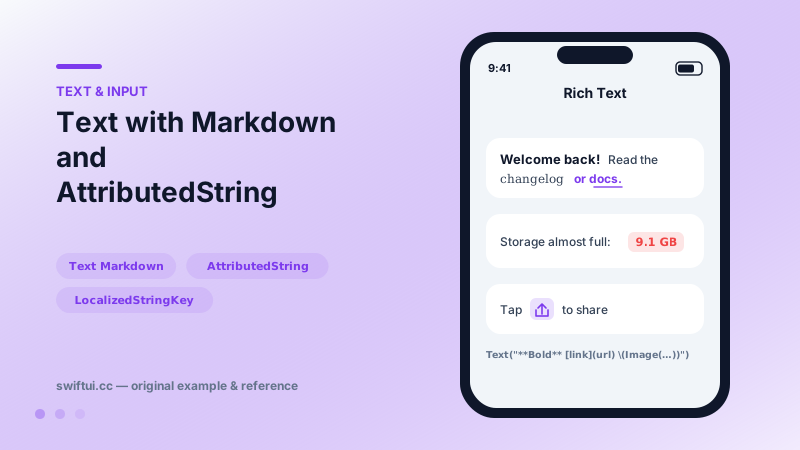
            Text("**Welcome back!** Read the *changelog* or [docs](https://example.com).")

            Text(highlighted)

            Text("Tap \(Image(systemName: "square.and.arrow.up")) to share")
        }
        .padding()
    }
}
Literals are special
Text("**Bold** and [link](https://…)") parses because literals become LocalizedStringKey, which interprets Markdown. The same content in a String variable renders as raw asterisks — the most common surprise here. Convert explicitly:
let md = try? AttributedString(markdown: serverString)
Text(md ?? AttributedString(serverString))
This literal behavior is a localization feature: translators see and place the emphasis markers within their sentence structure.
AttributedString for programmatic runs
Find ranges and set attributes — color a price, bold a username, underline a match:
var s = AttributedString("Pay $4.99 now")
if let r = s.range(of: "$4.99") { s[r].foregroundColor = .green }
Attributes cover font, color, kerning, baseline offset, and links; SwiftUI-specific attributes coexist with Foundation ones.
Interpolation tricks
Text("Tap \(Image(systemName: "gear")) to configure") embeds the symbol inline at text size. Interpolating styled Text values composes differently-styled runs without AttributedString when the structure is static.
Common mistakes
- Expecting String variables to parse Markdown.
- Rebuilding AttributedString every render for static content — compute once.
- Markdown tables/headings in Text, which only supports inline-level syntax.
Related reference
Style Text with dynamic type styles, fontWeight, fontDesign, and fontWidth; load custom fonts with relative scaling so typography still respects accessibility.
Link opens URLs in the appropriate app or browser; the openURL environment action does the same programmatically, and openURL can be overridden to intercept taps.
Pass format styles directly to Text — currencies, percents, dates, measurements, lists, and even live timers — and get localization for free.