SwiftUI Text Fonts, Weights, and Designs
Style Text with dynamic type styles, fontWeight, fontDesign, and fontWidth; load custom fonts with relative scaling so typography still respects accessibility.
import SwiftUI

struct TypeRamp: View {
    @ScaledMetric(relativeTo: .title) private var badgeSize = 40.0

    var body: some View {
        VStack(alignment: .leading, spacing: 12) {
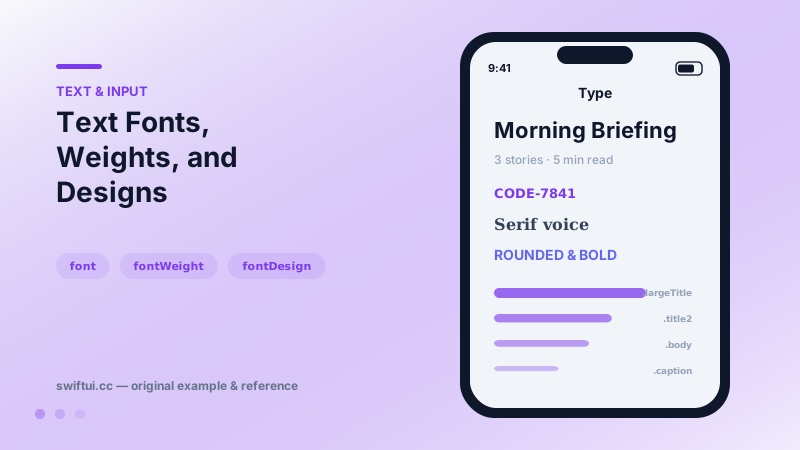
            Text("Morning Briefing")
                .font(.largeTitle)
                .fontWeight(.heavy)
                .fontDesign(.rounded)

            Text("3 stories · 5 min read")
                .font(.subheadline)
                .foregroundStyle(.secondary)

            Text("CODE-7841")
                .font(.system(.body, design: .monospaced))

            Text("Headline Pro")
                .font(.custom("Avenir Next", size: 22, relativeTo: .title2))

            Circle().fill(.teal)
                .frame(width: badgeSize, height: badgeSize)
        }
        .padding()
    }
}
Build on text styles
The system ramp — .largeTitle through .caption2 — is not just a size table. Each style carries weight, leading, and Dynamic Type scaling curves. Text("Title").font(.title2) adapts from compact phones to accessibility sizes; font(.system(size: 22)) stays frozen and eventually clashes with everything around it.
Weight, design, width
These three modifiers compose with any style:
Text("Score").font(.title).fontWeight(.black)
Text("Friendly").fontDesign(.rounded)
Text("Dense data").fontWidth(.condensed)
Design switches the whole face family — rounded for playful UI, serif for editorial, monospaced for code and tabular identifiers — while staying inside the scaling system.
Custom fonts that behave
Font.custom("Avenir Next", size: 22, relativeTo: .title2) keys your brand font to a style's scaling curve. Without relativeTo, the font ignores Dynamic Type — an accessibility regression hidden until a user with large text opens the app. For spacing and icon sizes that should track text, @ScaledMetric(relativeTo:) scales raw numbers the same way.
Common mistakes
- Hard-coded sizes sprinkled per-view instead of a small set of styles.
- Custom fonts without relativeTo.
- Using bold() on long body text where weight hierarchy belonged in the design.
Related reference
Control how text behaves under pressure: lineLimit and reserved space, minimumScaleFactor shrinking, truncationMode, tightening, and line spacing.
Text literals parse Markdown — bold, italics, code, links — while AttributedString unlocks programmatic runs, custom attributes, and styled interpolation.
Label pairs icon and title with style-aware rendering; LabeledContent pairs a label with a value — the standard grammar for settings rows and detail screens.