SwiftUI Label and LabeledContent Layouts
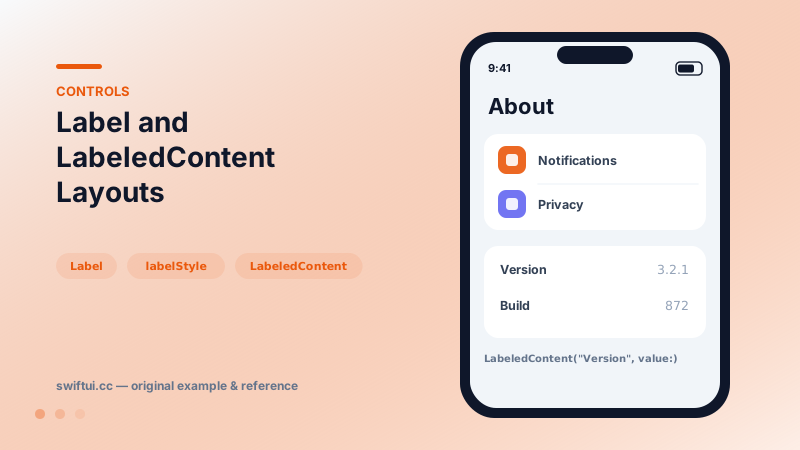
Label pairs icon and title with style-aware rendering; LabeledContent pairs a label with a value — the standard grammar for settings rows and detail screens.
import SwiftUI

struct AboutScreen: View {
    var body: some View {
        Form {
            Section {
                Label("Notifications", systemImage: "bell.badge")
                Label("Privacy", systemImage: "hand.raised")
            }
            Section {
                LabeledContent("Version", value: "3.2.1")
                LabeledContent("Build", value: "872")
                LabeledContent("Storage") {
                    Text("1.2 GB").foregroundStyle(.secondary)
                }
            }
        }
    }
}
Label: semantic icon + title
Label("Privacy", systemImage: "hand.raised") is not just an HStack. Containers understand it: menus can render icon and title in platform order, toolbars can drop to icon-only, lists align titles across rows regardless of glyph width. That adaptability is why Labels belong in buttons, menu items, and rows even when a manual stack looks identical today.
Custom label styles
struct TintedIconLabelStyle: LabelStyle {
    func makeBody(configuration: Configuration) -> some View {
        HStack {
            configuration.icon
                .foregroundStyle(.white)
                .frame(width: 28, height: 28)
                .background(.teal, in: .rect(cornerRadius: 6))
            configuration.title
        }
    }
}
Apply once with labelStyle on a container and every settings row gets the Settings-app icon treatment.
LabeledContent: name → value
LabeledContent("Version", value: "3.2.1") renders label leading, value trailing and secondary — the read-only row grammar. The content closure accepts any view, so a value can be a badge, a small chart, or a control; in Forms, controls inside LabeledContent inherit the label for accessibility.
Common mistakes
- Hand-built HStacks in menus that lose icon-only adaptation.
- Restyling each Label inline instead of one LabelStyle.
- Using LabeledContent for editable fields where the control's own label suffices.
Related reference
Form renders settings-style screens with platform-correct rows. Structure with Sections, headers and footers, headerProminence, and per-row background and inset control.
Restyle List without leaving it: listRowBackground, listRowInsets, separator visibility and tint, listRowSpacing, listSectionSpacing, and scrollContentBackground.
Pass format styles directly to Text — currencies, percents, dates, measurements, lists, and even live timers — and get localization for free.