SwiftUI Text Formatting: Dates, Numbers, and Measurements
Pass format styles directly to Text — currencies, percents, dates, measurements, lists, and even live timers — and get localization for free.
import SwiftUI

struct OrderSummary: View {
    let total = 1499.5
    let weight = Measurement(value: 2.4, unit: UnitMass.kilograms)
    let placed = Date.now

    var body: some View {
        List {
            LabeledContent("Total") {
                Text(total, format: .currency(code: "USD"))
            }
            LabeledContent("Discount") {
                Text(0.15, format: .percent)
            }
            LabeledContent("Weight") {
                Text(weight, format: .measurement(width: .abbreviated))
            }
            LabeledContent("Placed") {
                Text(placed, format: .dateTime.day().month(.wide).year())
            }
            LabeledContent("Arrives") {
                Text(placed.addingTimeInterval(7200), style: .relative)
            }
        }
    }
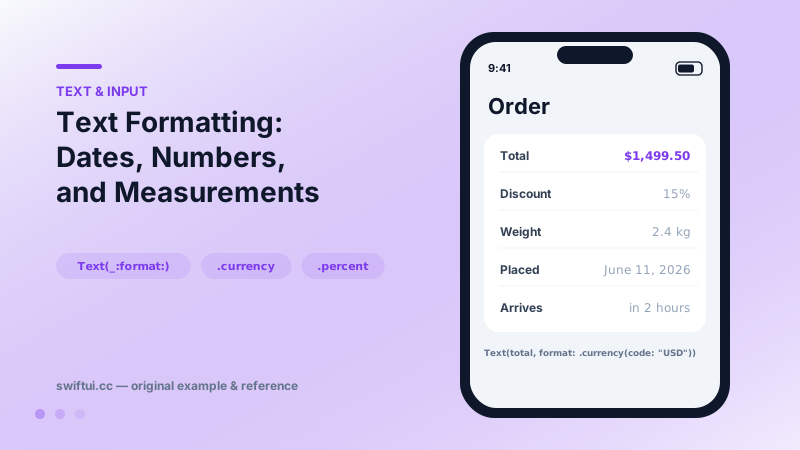
}
Formatting moved into Text
Text(total, format: .currency(code: "USD")) renders "$1,499.50" in the US and "1 499,50 $US" in France — the format style consults the environment locale at render time. The pattern covers numbers (.number.precision(.fractionLength(1))), percents, currencies, measurements, person names, and lists (.list(type: .and) → "Ann, Ben, and Chris").
Composable dates
Text(date, format: .dateTime.weekday(.wide).hour().minute())You declare which fields appear and at what width; the locale decides ordering and separators. This kills the classic bug of hard-coded "MM/dd/yyyy" confusing half the world.
Text that ticks
Date styles make self-updating text declarative:
Text(deadline, style: .relative)   // "in 2 hours" … counts down
Text(start, style: .timer)         // "01:42" … counts up
Text(timerInterval: start...end)   // bounded countdown
No Timer publishers, no invalidation bugs — the framework schedules updates.
Measurements
Measurement(value: 5, unit: UnitLength.kilometers) formatted with .measurement(width: .wide) prints "5 kilometers" or locale-converted units; pass usage: to control whether conversion happens (e.g. keep raw units for technical data).
Common mistakes
- String(format:) for UI values, freezing locale behavior.
- Manually computing "2 hours ago" strings the relative style produces correctly.
- Formatting in view models eagerly, losing automatic locale-change updates.
Related reference
Style Text with dynamic type styles, fontWeight, fontDesign, and fontWidth; load custom fonts with relative scaling so typography still respects accessibility.
DatePicker binds a Date with selectable components — date, time, or both — bounded ranges, and styles from compact rows to the full graphical calendar.
Label pairs icon and title with style-aware rendering; LabeledContent pairs a label with a value — the standard grammar for settings rows and detail screens.