SwiftUI DatePicker Components and Styles
DatePicker binds a Date with selectable components — date, time, or both — bounded ranges, and styles from compact rows to the full graphical calendar.
import SwiftUI

struct DeliveryForm: View {
    @State private var slot = Date()

    var body: some View {
        Form {
            DatePicker("Delivery",
                       selection: $slot,
                       in: Date.now...,
                       displayedComponents: [.date, .hourAndMinute])

            DatePicker("Pick a day",
                       selection: $slot,
                       displayedComponents: .date)
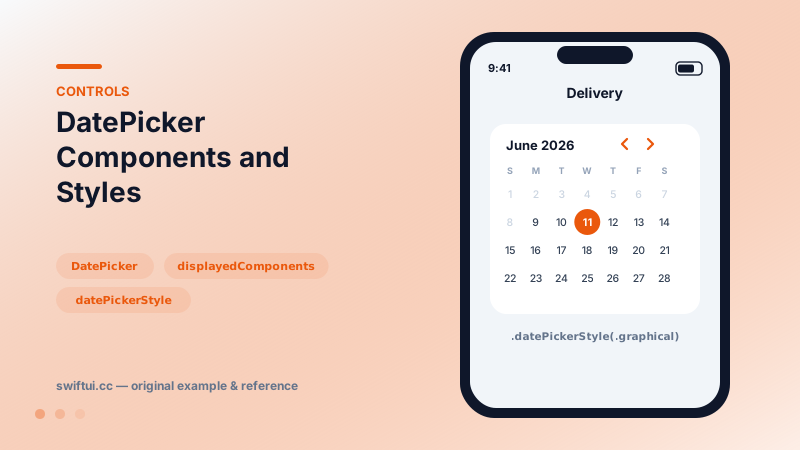
                .datePickerStyle(.graphical)
        }
    }
}
One binding, configurable surface
DatePicker always binds a complete Date; displayedComponents only chooses which parts the UI exposes. A time-only picker still carries the day — normalize with Calendar when you compare or store.
Bounding
DatePicker("Birthday", selection: $birthday, in: ...Date.now,
           displayedComponents: .date)
One-sided ranges read like the requirement: birthdays end today, deliveries start today. Out-of-range dates render disabled in the graphical style rather than vanishing, which keeps the calendar oriented.
Styles
.compact collapses into a form row and pops the editor on tap — the default and usually right. .graphical embeds the full month grid, worth its vertical cost when neighboring-day context matters (booking, planning). .wheel keeps the classic drum for kiosk-like flows.
Sheet pattern
A compact row inside a Form plus a .graphical picker inside a sheet gives a clean two-step UX: glance at the value, tap to open a roomy editor.
Common mistakes
- Comparing picked dates with == while stray time components differ.
- Graphical pickers inside tight list rows, where the grid gets clipped.
- Omitting the range and validating after the fact with error alerts the picker could have prevented.
Related reference
MultiDatePicker binds a Set of DateComponents and lets users toggle several days on a calendar grid — availability, shifts, and recurring plans.
Picker binds a selection to tagged options. Drive it from a CaseIterable enum, choose menu, wheel, inline, or navigationLink styles, and group options with sections.
Pass format styles directly to Text — currencies, percents, dates, measurements, lists, and even live timers — and get localization for free.