SwiftUI Picker Styles and Enum Selection
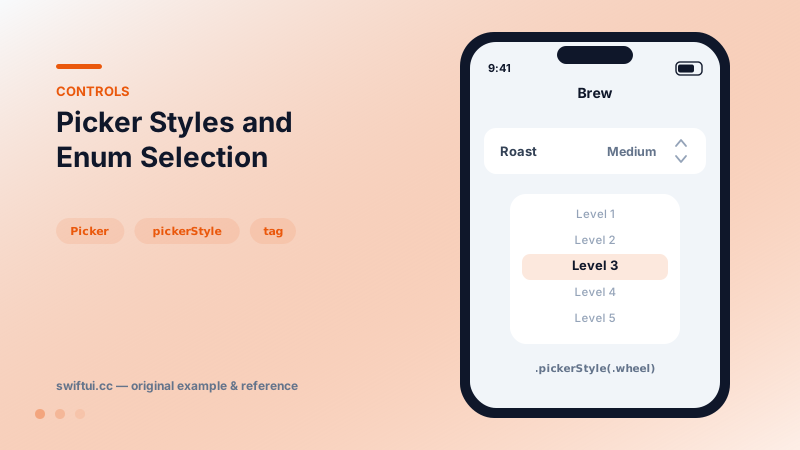
Picker binds a selection to tagged options. Drive it from a CaseIterable enum, choose menu, wheel, inline, or navigationLink styles, and group options with sections.
import SwiftUI

enum Roast: String, CaseIterable, Identifiable {
    case light, medium, dark
    var id: Self { self }
}

struct BrewSettings: View {
    @State private var roast: Roast = .medium

    var body: some View {
        Form {
            Picker("Roast", selection: $roast) {
                ForEach(Roast.allCases) { roast in
                    Text(roast.rawValue.capitalized).tag(roast)
                }
            }
            .pickerStyle(.menu)

            Picker("Grind", selection: .constant(2)) {
                ForEach(1...5, id: \.self) { n in
                    Text("Level \(n)").tag(n)
                }
            }
            .pickerStyle(.wheel)
        }
    }
}
Tags are the wiring
A picker is a binding plus options, and every option needs a tag whose type matches the binding. With String raw-value enums, Text(roast.rawValue).tag(roast) keeps choice and model in lockstep — no string-to-enum conversion code.
An Optional binding needs Optional tags: .tag(Optional(roast)) or .tag(Roast?.none) for a "no selection" row. Mismatched optionality is the most common reason a picker "does not update."
Style decides the interaction
.pickerStyle(.menu)            // compact popup — form default
.pickerStyle(.wheel)           // drum roller, good in sheets
.pickerStyle(.segmented)       // all options visible
.pickerStyle(.inline)          // expanded rows in a form
.pickerStyle(.navigationLink)  // drill into a selection list
.navigationLink requires a NavigationStack and suits long option lists; .inline suits short lists worth seeing at once.
Sections inside
Options can group with Section("Popular") { … } inside the picker content — menu and inline styles render the groupings.
Common mistakes
- Int tags with a String binding (or vice versa) — selection silently never matches.
- Wheel style in scrolling forms, where the wheel fights the scroll gesture.
- Recreating the options array each render with unstable identity.
Related reference
pickerStyle(.segmented) shows every option side by side — the right widget for 2–4 visible, equal choices like view modes and filters.
DatePicker binds a Date with selectable components — date, time, or both — bounded ranges, and styles from compact rows to the full graphical calendar.
Toggle binds a Bool to a switch. Recolor with tint, render as a button with .button style, batch with sections, or design your own look via ToggleStyle.