SwiftUI Form Sections and Row Styling
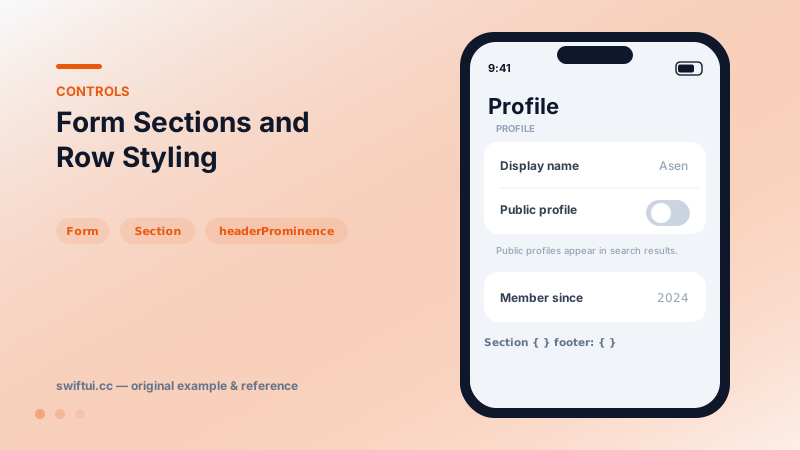
Form renders settings-style screens with platform-correct rows. Structure with Sections, headers and footers, headerProminence, and per-row background and inset control.
import SwiftUI

struct ProfileSettings: View {
    @State private var name = "Asen"
    @State private var isPublic = false

    var body: some View {
        Form {
            Section {
                TextField("Display name", text: $name)
                Toggle("Public profile", isOn: $isPublic)
            } header: {
                Text("Profile")
            } footer: {
                Text("Public profiles appear in search results.")
            }

            Section("About") {
                LabeledContent("Member since", value: "2024")
            }
            .headerProminence(.increased)
        }
    }
}
Forms are opinionated — that is the point
Drop controls into Form and they re-dress themselves for a settings context: pickers collapse into menu rows, labels align, spacing matches the platform. You write semantics; the form supplies the visual grammar users already know from Settings.
Section anatomy
Section {
    rows
} header: {
    Text("Notifications")
} footer: {
    Text("Critical alerts bypass Do Not Disturb.")
}
Headers name the group; footers carry consequences and constraints. headerProminence(.increased) promotes top-level groups on long screens. Sections can also fold by initializing with isExpanded bindings in sidebar-style lists.
Styling within the grammar
Row-level List APIs apply: listRowBackground highlights a row (a selected plan, a warning state), listRowInsets makes media rows full-bleed, and scrollContentBackground(.hidden) plus a custom background rebrands the whole canvas. formStyle(.grouped) and .columns (Mac) switch macro layouts.
Common mistakes
- Fighting Form for custom marketing layouts it was never meant to produce.
- Burying explanations in alerts when footers exist.
- Mixing unrelated settings in one section because they 'fit'.
Related reference
Restyle List without leaving it: listRowBackground, listRowInsets, separator visibility and tint, listRowSpacing, listSectionSpacing, and scrollContentBackground.
Toggle binds a Bool to a switch. Recolor with tint, render as a button with .button style, batch with sections, or design your own look via ToggleStyle.
Label pairs icon and title with style-aware rendering; LabeledContent pairs a label with a value — the standard grammar for settings rows and detail screens.