SwiftUI OutlineGroup and Hierarchical Lists
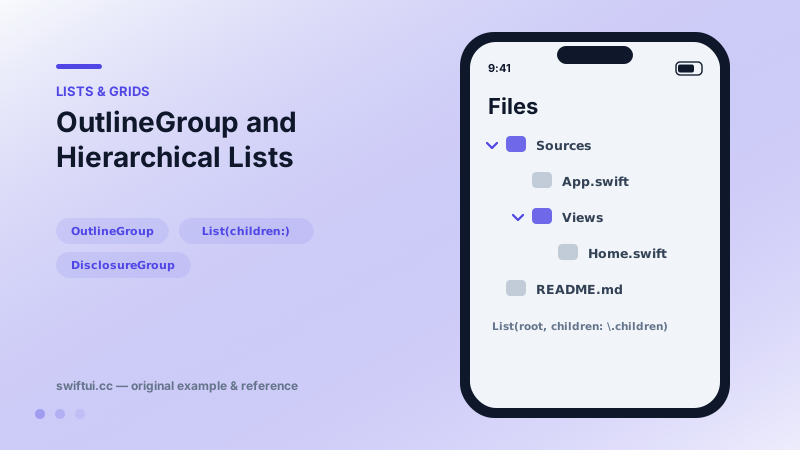
OutlineGroup and List(children:) render tree-shaped data with disclosure triangles — file browsers, org charts, and nested categories without manual recursion.
import SwiftUI

struct FileItem: Identifiable {
    let id = UUID()
    let name: String
    var children: [FileItem]? = nil
}

struct FileTree: View {
    let root = [
        FileItem(name: "Sources", children: [
            FileItem(name: "App.swift"),
            FileItem(name: "Views", children: [
                FileItem(name: "Home.swift")
            ])
        ]),
        FileItem(name: "README.md")
    ]

    var body: some View {
        List(root, children: \.children) { item in
            Label(item.name,
                  systemImage: item.children == nil ? "doc" : "folder")
        }
    }
}
Recursion as a key path
Tree UIs used to mean recursive view structs. OutlineGroup collapses that to one declaration: give it the roots and a key path to optional children, and it walks the structure, indenting and adding disclosure triangles as it goes.
OutlineGroup(root, children: \.children) { item in
    Text(item.name)
}
List(root, children: \.children) is the same engine with list styling — the form most apps want.
nil vs empty children
The optionality of children carries meaning. nil means "leaf — no triangle." An empty array means "branch that could have children" and still shows the disclosure control. Map your domain accordingly: files get nil, empty folders get [].
Controlling expansion
OutlineGroup keeps expansion internal. When requirements include expand-all, restore-on-launch, or analytics per toggle, compose the tree yourself from DisclosureGroup(isExpanded:) nodes — the visual result is identical and the state is yours.
Common mistakes
- Empty-array leaves producing pointless triangles everywhere.
- Unstable ids in tree nodes breaking expansion when data reloads.
- Mixing drill-in NavigationLinks and inline expansion in one list, which disorients users.
Related reference
DisclosureGroup hides detail behind a chevron with optional isExpanded bindings for programmatic control, custom labels, and nested groups for settings trees.
List renders platform-native rows from data. ForEach adds onDelete and onMove editing, and a selection binding turns rows tappable with single or multi-select.
Table presents multi-column data with selectable rows and sortable headers on Mac and iPad, collapsing gracefully to its first column on iPhone.