SwiftUI Gauge Styles: Linear and Circular
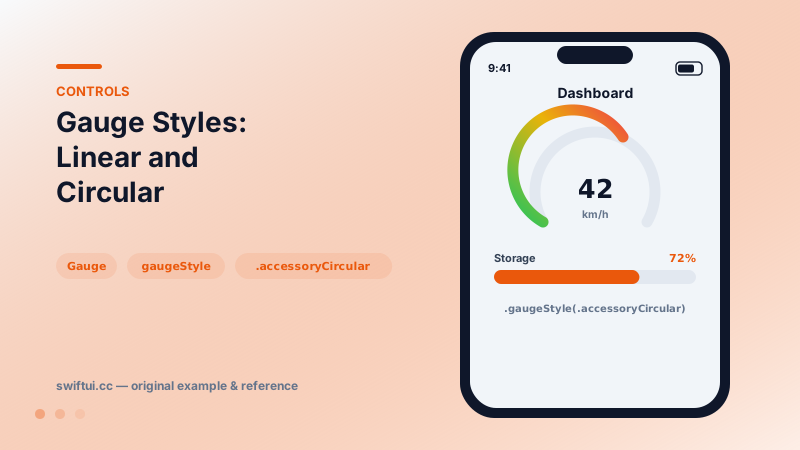
Gauge shows a value within bounds — linear bars or circular dials — with current/min/max labels and accessoryCircular styles sized for compact dashboards.
import SwiftUI

struct Dashboard: View {
    let speed = 42.0
    let storageUsed = 0.72

    var body: some View {
        HStack(spacing: 32) {
            Gauge(value: speed, in: 0...80) {
                Text("km/h")
            } currentValueLabel: {
                Text("\(Int(speed))")
            }
            .gaugeStyle(.accessoryCircular)
            .tint(Gradient(colors: [.green, .yellow, .red]))

            Gauge(value: storageUsed) {
                Text("Storage")
            } currentValueLabel: {
                Text(storageUsed, format: .percent.precision(.fractionLength(0)))
            }
            .gaugeStyle(.linearCapacity)
            .tint(.indigo)
        }
        .padding()
    }
}
Measurement, not progress
A gauge answers "how much, within what?" — speed within a legal limit, battery within capacity. The semantic difference from ProgressView matters: progress implies an end state coming; a gauge is a stable reading.
Label slots
The full form takes four labels — main, current value, minimum, maximum:
Gauge(value: level, in: 0...100) { Text("Battery") }
    currentValueLabel: { Text("\(Int(level))%") }
    minimumValueLabel: { Text("0") }
    maximumValueLabel: { Text("100") }
Styles decide which slots render; accessory circular styles put the current value in the center and the main label below.
Style gallery
.linearCapacity fills a bar left to right — storage and quotas. .accessoryLinear is a needle on a track. .accessoryCircular draws an open ring with a marker, and .accessoryCircularCapacity fills the ring — at-a-glance dashboard tiles. The same Gauge code restyles across contexts, including watch complications.
Zone gradients
tint(Gradient(colors: [.green, .yellow, .red])) colors the track along its length, encoding zones without extra views. Place thresholds by adjusting color stops if zones are uneven.
Common mistakes
- Using Gauge for download progress, which confuses its meaning.
- Omitting the current value, forcing users to eyeball the dial.
- Ranges derived from data maximums that change between renders.
Related reference
ProgressView spins while waiting and fills while completing. Set value and total for determinate progress, label the current state, and tint or restyle as needed.
Slider binds a continuous value to a track. Set bounds and step, add min/max images, react to editing phases with onEditingChanged, and tint the filled track.
Swift Charts builds charts from marks — BarMark, LineMark, PointMark, AreaMark, SectorMark — each mapping data fields to visual position, with foregroundStyle(by:) for series.