SwiftUI ProgressView: Indeterminate, Determinate, and Styled
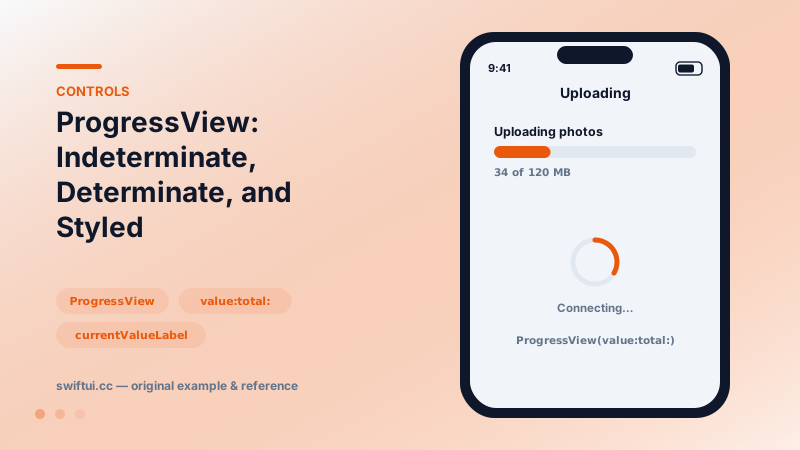
ProgressView spins while waiting and fills while completing. Set value and total for determinate progress, label the current state, and tint or restyle as needed.
import SwiftUI

struct UploadProgress: View {
    @State private var sent = 34.0

    var body: some View {
        VStack(spacing: 24) {
            ProgressView(value: sent, total: 120) {
                Text("Uploading photos")
            } currentValueLabel: {
                Text("\(Int(sent)) of 120 MB")
            }
            .tint(.teal)

            ProgressView("Connecting…")
                .controlSize(.large)
        }
        .padding()
    }
}
Two modes, one view
ProgressView() with no arguments spins forever — honest about ignorance. ProgressView(value: 0.4) (or value:total:) fills a track — honest about progress. Choosing correctly is a UX decision: determinate progress measurably reduces perceived wait time, so prefer it whenever you can estimate.
Counting steps
Totals need not be bytes:
ProgressView(value: Double(step), total: Double(totalSteps)) {
    Text("Step \(step) of \(totalSteps)")
}
Onboarding flows, import pipelines, and batch operations all map cleanly.
Styling
tint recolors the default styles. progressViewStyle swaps form: .linear, .circular, or a custom ProgressViewStyle whose configuration exposes fractionCompleted — the hook for ring-shaped progress or branded bars. A custom style is ~10 lines; resist rebuilding progress from Shapes when the configuration already carries the math.
Timer-backed progress
ProgressView(timerInterval:) renders a self-updating countdown bar — Live Activities and rest timers use this without manual ticking.
Common mistakes
- Indeterminate spinners for 30-second operations that could report progress.
- Updating value from background threads without main-actor hops.
- Hiding the bar at 100% instantly, before users perceive completion.
Related reference
Gauge shows a value within bounds — linear bars or circular dials — with current/min/max labels and accessoryCircular styles sized for compact dashboards.
ContentUnavailableView standardizes empty, error, and no-results screens with an icon, title, description, and action buttons — including the built-in search variant.
Represent unavailable, loading, private, and pass-through states with the right interaction and visual modifiers.