SwiftUI Button Roles, Styles, and Repeat Behavior
Button pairs an action with any label. Roles mark destructive and cancel semantics, built-in styles cover most designs, and buttonRepeatBehavior auto-repeats while held.
import SwiftUI

struct DocumentActions: View {
    var body: some View {
        VStack(spacing: 12) {
            Button {
                // save
            } label: {
                Label("Save Document", systemImage: "tray.and.arrow.down")
                    .frame(maxWidth: .infinity)
            }
            .buttonStyle(.borderedProminent)
            .controlSize(.large)

            Button("Duplicate") { }
                .buttonStyle(.bordered)

            Button("Delete", role: .destructive) { }
                .buttonStyle(.bordered)
        }
        .padding()
    }
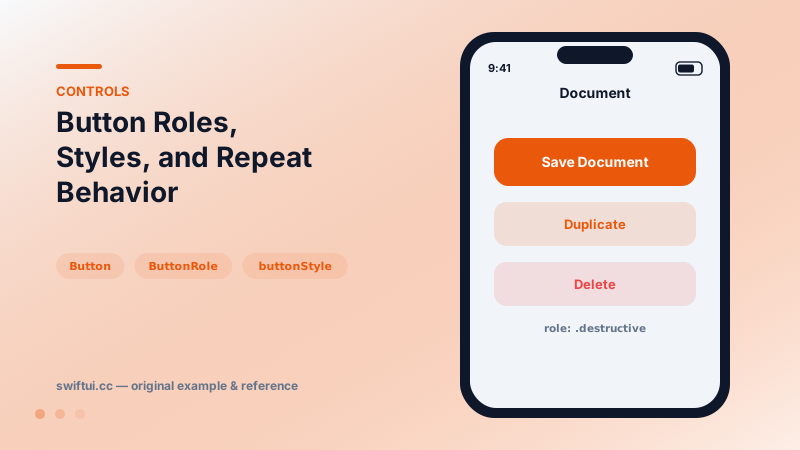
}
Anatomy
A button is an action plus a label view. The label can be any view — Label, an image-and-text stack, a custom badge — and the closure-label initializer keeps complex labels readable.
Roles carry meaning
Button("Delete", role: .destructive) { delete() }
Button("Cancel", role: .cancel) { }
Inside Menu, confirmationDialog, and alert, roles drive the system's placement and coloring — cancel buttons get their standard slot, destructive ones turn red. Using roles instead of manual .foregroundStyle(.red) keeps behavior consistent everywhere the button appears.
Styles and sizing
The built-in styles express prominence levels. .borderedProminent + controlSize(.large) + frame(maxWidth: .infinity) is the standard primary CTA recipe; .bordered siblings read as secondary. tint recolors a style without redesigning it.
Repeat behavior
buttonRepeatBehavior(.enabled) turns press-and-hold into repeated action firing — exactly what volume nudgers, quantity steppers, and scrubbers want, with system-tuned acceleration instead of a custom timer.
Common mistakes
- Three prominent buttons in one view, so nothing is actually prominent.
- Wrapping navigation in Buttons that mutate state instead of using NavigationLink values.
- Tiny icon-only buttons without padding, failing the 44-point target.
Related reference
Toggle binds a Bool to a switch. Recolor with tint, render as a button with .button style, batch with sections, or design your own look via ToggleStyle.
Menu collects actions behind one button with full support for sections, nested submenus, destructive roles, primaryAction, and menuOrder control.
Create reusable control styles when repeated UI behavior belongs to the component system rather than a single screen.