SwiftUI GeometryReader Size and Coordinates
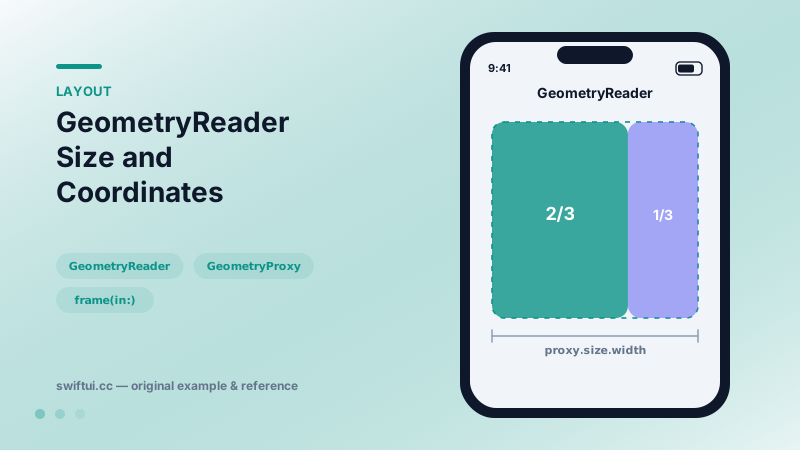
GeometryReader hands you the size and frame proposed by the parent so children can adapt. Read frames in .local, .global, or named coordinate spaces — and reach for it sparingly.
import SwiftUI

struct ProportionalSplit: View {
    var body: some View {
        GeometryReader { proxy in
            HStack(spacing: 0) {
                Color.teal
                    .frame(width: proxy.size.width * 2 / 3)
                    .overlay(Text("Chart").bold())
                Color.indigo
                    .overlay(Text("Legend").bold())
            }
            .foregroundStyle(.white)
        }
        .frame(height: 180)
    }
}
What the proxy knows
Inside GeometryReader { proxy in … } the GeometryProxy exposes three things: size (the proposal from the parent), safeAreaInsets, and frame(in:) for converting the reader's own rectangle into another coordinate space.
let local  = proxy.frame(in: .local)            // origin .zero
let global = proxy.frame(in: .global)           // screen space
let custom = proxy.frame(in: .named("scroll")) // ancestor-relative
Name the ancestor with .coordinateSpace(name: "scroll") — typically a ScrollView — and the frame becomes a stable scroll offset signal.
Two behavioral quirks
First, GeometryReader is greedy: it accepts the entire proposed size, so a small label wrapped in a reader suddenly occupies the whole cell. Second, it places children at the top-leading corner, not the center. Both are fixed by constraining the reader (.frame(height:)) and aligning children explicitly.
Modern alternatives
Many historical GeometryReader recipes now have direct APIs: containerRelativeFrame for "half the container wide", onGeometryChange for observing size, visualEffect for scroll-linked transforms, and ScrollView's scrollPosition for offset tracking. Reach for the reader when those cannot express the relationship.
Common mistakes
- Writing measured values into @State during layout, creating update loops.
- Using .global frames for math inside a scroll view that itself moves.
- Nesting readers when a single measurement plus a PreferenceKey would do.
Related reference
containerRelativeFrame sizes a view as a fraction of its nearest container — full width, one-of-three columns, or custom math — without GeometryReader.
Pass child measurements up the view tree with PreferenceKey when a parent needs information children know first.
Modern ScrollView is configured declaratively: scrollTargetBehavior for paging and snapping, scrollPosition for tracking, contentMargins for insets, plus bounce and disable controls.